The device information in IT Glue > Global > Datto is currently only available to Managers and Administrators.
A Datto integration will give you an extra screen in the Global area where you can view read-only data from your Datto dashboard.
Use the Quick Filters to view your Datto device details and their protection status in list view.
- Use the Device filter to view a list of all your Datto devices
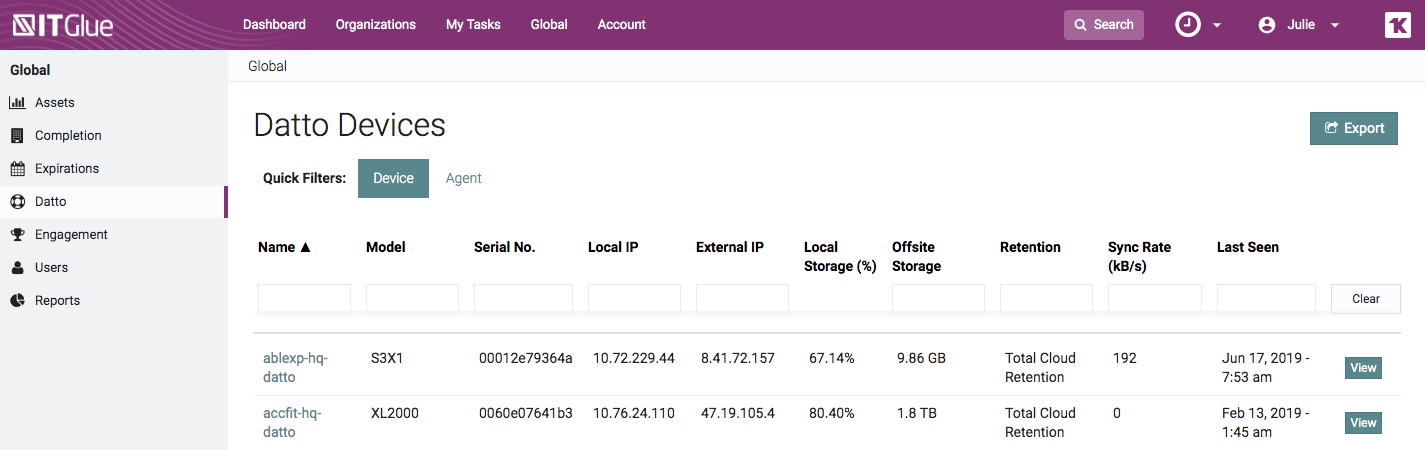
- Use the Agent filter to view all of the backup agents and their status
- Click on the name of a Datto device for more details

Additional Notes
- To manage a backup incident, as indicated by a
 (red x icon), you will need to access the Datto management screen on the Datto device.
 - The Datto list views can be sorted and searched.
- To search for a Datto device from the Search bar at the top of every screen, enter the Hostname, Model, Serial No, Local IP, or Remote IP.
Related articles