Introduction to Datto Commerce
Datto Commerce is a modern cloud-based platform designed to simplify how you quote, sell, and procure IT products and services. This article highlights the ways in which this all-in-one solution streamlines your ecommerce operations and maximizes your profits.
Overview
Your customers want to buy their IT products and services through a one-stop-shop that they trust. Datto Commerce equips you with all the tools necessary to fill this opportunity. Pursue easy and profitable selling while promoting greater engagement with your brand.
With a single view across multiple suppliers, you and your team can quickly identify solutions that meet your customers' needs. From any device, rely on Datto Commerce to achieve the following:
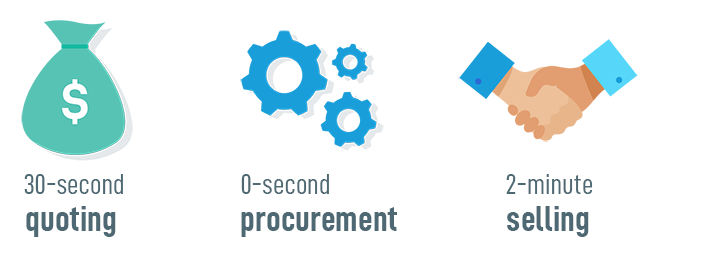
Reduce the start-to-finish quoting process from hours to minutes.
Conveniently find and sell products and services.
Automate procurement and reduce rework.
Datto Commerce automatically manages product creation, product retirement, and product pricing based on your supplier product feeds and the custom settings you choose.
Feature summary
Datto Commerce features two interfaces:
a fully branded Online Store built for both your staff and your customers to quickly find in-demand items, create customized quotes, and effortlessly sell or purchase
an Admin Center to manage, control, or automate it all
An admin login provides access to both areas. Admin users as well as your customers utilize the same Online Store. Administrative rights offer additional functionality, like the ability to see supplier pricing and product availability, adjust pricing, and access either a general view or any of your individualized customer portals.
Learn about Your Online Store and Your Admin Center.
Full, localized GfK Etilize product data is included in your Datto Commerce subscription. Intelligently link products from various suppliers with unique Manufacturer Part Numbers.
Supplier product feeds enable you to present a fully stocked, consistently up-to-date storefront after just a few setup clicks.
Learn about Adding suppliers and product feeds and Adding and managing products and services.
You have the option to offer a variety of pricing and payment options to your customers.
Configure automatically managed margins, bulk or bundle pricing, group discounts, special offers, automated bid pricing, and more.
Based on rules you set, Datto Commerce automatically calculates specific customer pricing and shipping costs upon checkout and in quotes.
Learn about Pricing.
Create and send customer-focused, template-based quotes in as little as 30 seconds.
Or, you might prefer to sell a product to your customer without quoting. Datto Commerce empowers your staff members to easily purchase on a customer's behalf. You can control whether or not orders require approval.
After quoting and selling, manage your results for each from single pages in your Admin Center. Associated quotes, sales orders, and purchase orders automatically link to one another and to opportunities or tickets in your PSA system.
Datto Commerce automatically generates sales order and raises supplier purchase orders based on the best supplier availability and price.
Automated procurement speeds supply and increases transaction reliability.
While you're starting out, you may choose to leverage more control over your ecommerce processes. Flexible settings allow you to structure your workflow to suit your business needs and evolve it over time.
Learn about Choosing sales settings.
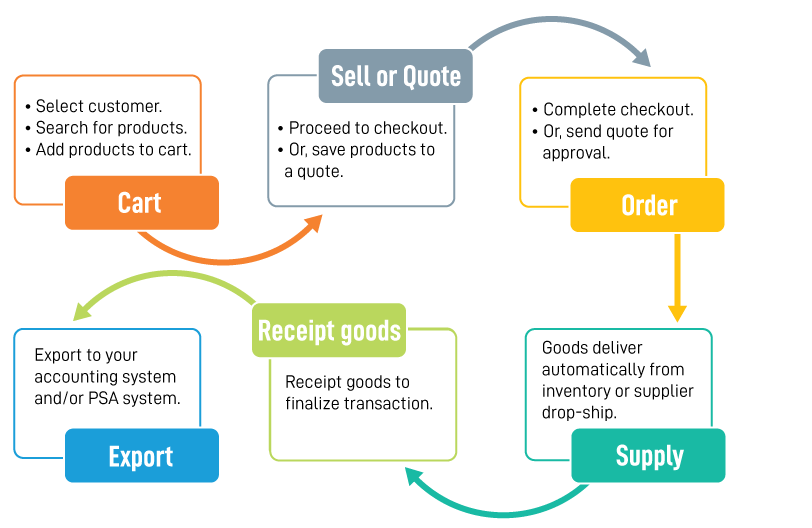
Transaction workflow
The following diagram illustrates the basic workflow of a Datto Commerce transaction, from selling products to exporting information into your process apps.
Save time by integrating Datto Commerce with your PSA system, such as Autotask PSA or ConnectWise Manage, or accounting system, such as QuickBooks Online or Xero. Tickets and opportunities that you sync automatically update with quote amendments or when converted to sales orders.
To learn more about how you can integrate Datto Commerce with your existing business management tools and how they work in conjunction, review Processing.
Getting started
We recommend utilizing the in-app interactive walk-throughs to carry out your Initial setup. From there, this Help system is designed to guide you through all aspects of your Datto Commerce journey: configuration, use, management, and reporting.
Whenever you're ready to get your customers shopping, offer up your Online Store instructions for customers built by the experts.
Need support?
Explore answers to our FAQs.
The Datto Commerce experts are responsive and reliable. With our deep industry know-how and commitment to your success, we can help you identify solutions and grow your business. Ask us how.
 | Need troubleshooting help? Open the Datto Help Center |
 | Have an idea for a new feature? Want to learn about upcoming enhancements? Visit the ideas forum! |
 | Provide feedback for the Documentation team |
Was this article helpful?
Yes NoWhy wasn't this article helpful? (check all that apply)
Thanks for your feedback.Want to tell us more?
Great!
Thanks for your feedback. Want to tell us more?