Topic
This article describes system and environment prerequisites for registering your Azure Cloud SIRIS.
Environment
Datto Continuity for Microsoft Azure (DCMA)
Description
If you are a returning partner for the Azure beta trial, refer to the When to remove and recreate your Microsoft Azure trial setup article before continuing.
Datto recommends creating test Azure environments for Beta Testing. If you elect to use the Beta product on your production system for Beta testing, be aware that:
the DCMA solution will clash with other backup solutions installed.
you will be unable to restore back to Azure for any recovery point older than seven days.
you will not have access to these backups after the beta trial. Therefore, you will have a gap in backup coverage for this production system for the duration of the beta trial program timeframe.
Environment topology
Your Azure environment will back up to the Azure Cloud SIRIS, which is hosted and administered by Datto.
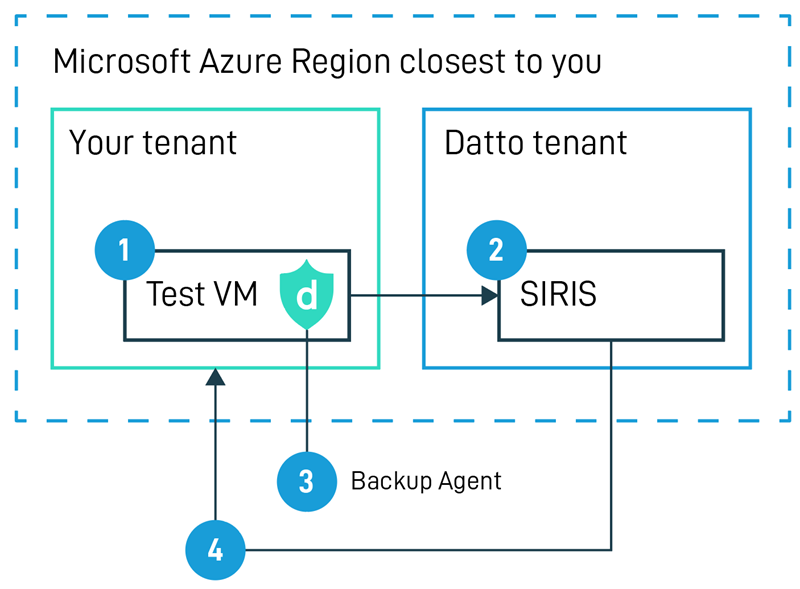
Figure 1: Azure and Cloud SIRIS environment
Prerequisites
Before you can register your Azure Cloud SIRIS, you must prepare a basic Azure environment containing these elements:
A tenant and subscription
Two Microsoft Azure VMs for the test
A restore environment
Tenant and subscription setup
As the user setting up the trial, you will need elevated Azure permissions.
You must be a Global Admin of the tenant, and the owner of the subscription.
Set up a simple subscription. For this trial, Datto recommends a single VNET, single subnet, and single resource group.
Do not use a client environment or VM for this test.
Test VM setup
Inside the subscription you created, you must set up two test Microsoft Azure VMs that the Datto Cloud Continuity Agent will protect. These VMs must be:
in one of the following regions: US East (not US East 2), US West, Canada Central, UK South, or AUS East.
Windows Server 2016 or Windows Server 2019
The VMs can have a single volume or multiple volumes. You may run the VMs with or without a relevant workload (i.e. domain controller, database, app or file server).
Restore environment setup
Beginning with the beta phase of the Azure trial, it is no longer necessary to specify a network security group in the test restore environment.
As part of the trial, you will perform a restore back to the Azure subscription. Please configure a separate set of resources in the same subscription that exactly follows these parameters:
Resource group: datto-restore
VNET: The VNET name will vary based on the region where you are hostiing your VMs for the Beta trial:
| Region | VNET name |
|---|---|
| EastUS | datto-restore-vnet-eastus |
| WestUS | datto-restore-vnet-westus |
| Canada Central | datto-restore-vnet-canadacentral |
| UK South | datto-restore-vnet-uksouth |
| Australia East | datto-restore-vnet-australiaeast |
Subnet: default